Built to Change: How AmplifyUP Keeps Evolving without Collapsing
AI-Assisted Proofreading
All articles on this site are written by me. I use AI tools solely for proofreading and editing assistance to ensure clarity and accuracy.
Hello friends and welcome back to my blog, today I’m going to share some of the secret sauce of how I keep evolving AmplifyUP while using AI Development heavily along the way. My biggest challenge has been, how do I keep the application from drifting while I’m implementing a specific feature. If you didn’t catch my last blog, I announced AmplifyUP which is a DXP I built from the ground up. But with a product that has that many moving parts (which I’ll be sharing more details about the under the cover capabilities of that product soon), how do I keep it from drifting over time.
Drift is the Default
As the name implies, I started early keeping this in mind instead of just holding my hands up and saying AI can’t build a complex product. I knew it was possible, because AI forward companies like Anthropic have been doing this for awhile now. But it was also true that it can’t do that without proper guardrails. With AI Development at the forefront, I knew that most of the time AI does a good job, but there are those moments where it makes you want to pull your hair out, and we’ve all had those moments. Not only those moments, but also where you have it work on x, and you end up with a side effect where a completely unrelated interface gets touched, and usually with a large application you wouldn’t notice that changed until long after you tested your original changes.
Now you could manually watch AI make every change, to every line of code, but true AI Development is about finding processes to reduce where you “the Human” is absolutely needed to still get the output you need, but keep this Drift from occurring. It’ll always happen, but finding ways to prevent the drift as much as possible is the key.
There are different types of drift as well, there could be drift with adding new API’s that don’t exactly meet your standards, and then there is UI drift. Coming up in “Tests Are a First Class Citizen” we’ll talk more about how Testing becomes a critical guardrail to your AI Development Harness to help reduce this further. Typically Drift will happen more frequently when AI assumes the wrong thing, so this requires building applications in smaller bits. Approaching an AI Development project with a more Agile approach, using Feature Flagging and shipping more frequently, means smaller and more precise changes, and that is how you keep AI from drifting your application too far. A great video worth watching is “Software is Changing (Again) by Karpathy”.
The Loop: Ticket In, PR Out
I knew pretty early on when I was building this product out, as it started to transition to something more than just a hobby project, that I would need a way to accelerate my efforts, but still build a quality product. The initial build of what you see today was actually built using a pretty hands-on approach, but as we already discussed Drift + AI Development, although a fast option, it was still not an ideal approach because I had no way to track the Drift. Parts of AmplifyUP are extremely complex applications in themselves, for example the Composer tool (Visual Builder) has many different interfaces and many different UX flows, and just crafting updates would typically lead to other things breaking. So I set out a few months ago with Claude Code specifically to reinvent this loop. Or really just build a more solid Harness for Claude Code, so that I could have some confidence in the output. It meant defining a more rigid process, instead of just building any idea that came to mind. I needed more environments so that I could properly test before a production rollout, as was pretty standard before AI was born, and I needed a better process to define, create and curate the work that was being done.
Environments
This is more of a standard SDLC process. When I first started it was just all on my local. It didn’t stay that way for long, because as you’ll see our Customer Data Platform (CDP) required these changes to be live sooner rather than later. For the longest time however I had local + Production, and unfortunately I didn’t really have a good way to test, except in production, so I knew setting up a UAT environment was critical. Today it exists as a complete mirror of production. All the regression tests happen on UAT using real test scripts to confirm all is good before we ship to production. Everything that happens is automated. Infrastructure uses Terraform to deploy out to AWS, Vercel, Neon (Postgresql) and more.
Refactoring
Another large improvement that really lent itself well to our improvements was a refactoring away from random components everywhere and shifting to a feature driven architecture for our frontend components. As we’ll discuss in the testing section, there was marked improvement in determining what to test and when it should be tested. Also breaking down massive files, which were created during the initial POC stage, was critical. It’s easier to drift a file that is 50k lines. Yes that’s not a made up number, the Composer tool had just kept growing and growing while new changes were being made to it. I used AI of course to assist with the refactoring even though this was also a challenge. Baby steps in the right direction led to much smaller files, that are easier for a human to navigate, and much easier for an AI developer to find little bugs and tweak a couple lines of code.
New Tools
The new process requires a rethink about the tools, or really the lack of tools I had in place before. The first tool that’s worth talking about is our use of Linear for tracking tickets. I actually had started using it before I really started to focus on this Harness and rapid development workflow, but only at a high level. The shift to a more autonomous flow that I currently have built requires using AI to even work on creating the tickets. Logging bugs always funnels through Claude Desktop, and further automations will happen in the future, including customer specific tickets that funnel through AI to triage and create tickets. 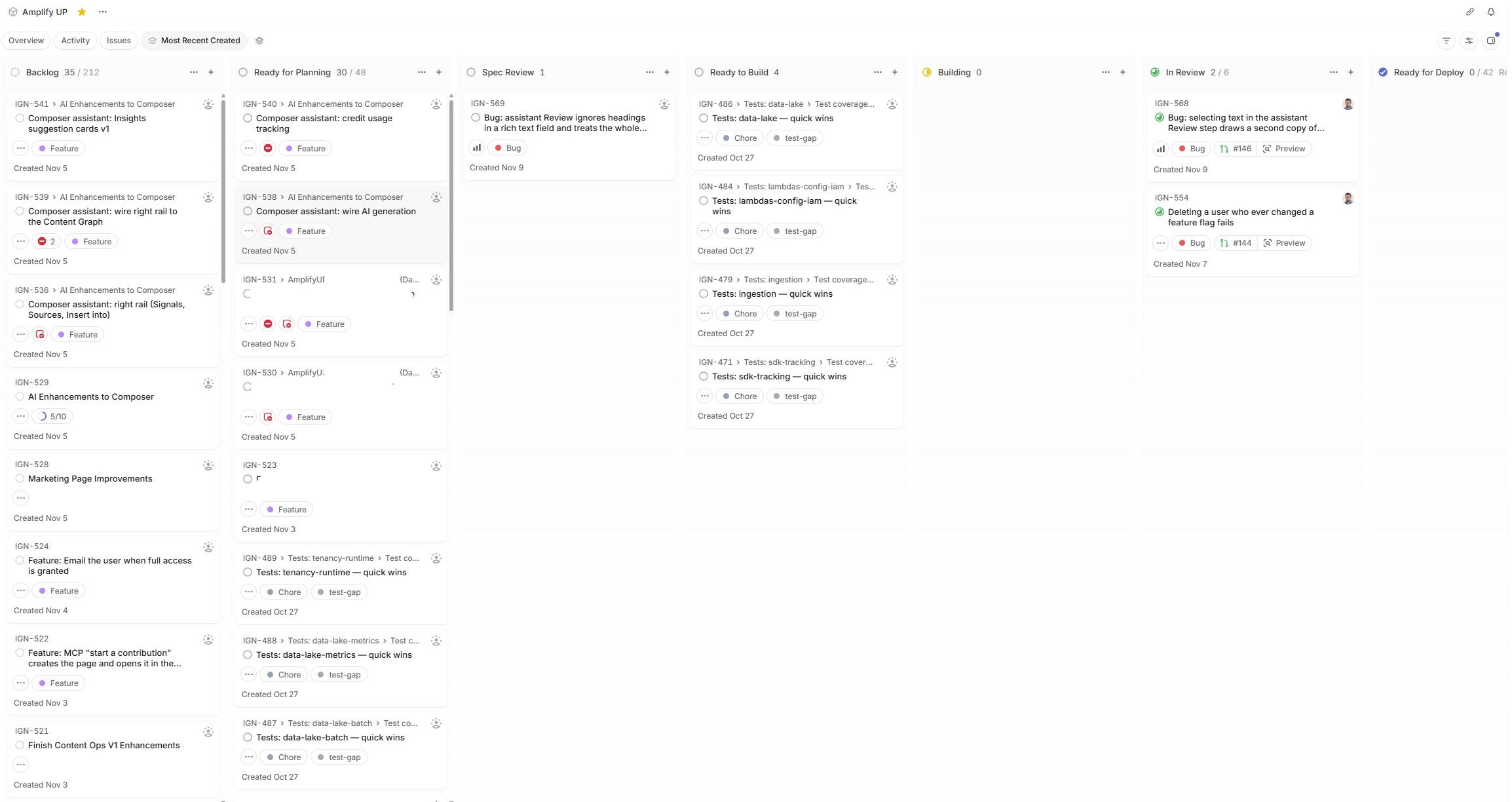 I’ve also created a full milestone release process, kind of mixing traditional SDLC practices with an AI driven one, where my role is more Spec review and PR review, vs actual in the code development. Every ticket moves through a set of states that make it obvious where it stands: Ready for Planning, Spec Review, Ready to Build, Building, In Review, then on through UAT to Production.*
Probably the tools that saw the biggest changes were the additional skills and processes in Claude Desktop and Claude Code, as well as GitHub Actions. To keep costs lower when shipping many more changes, we shifted to new runners outside of GitHub, including running Regression tests on a local runner. We’ll chat more about the tests in a bit, because that really is our guardrail to limit drift.
In Claude Code, we created a new global skill called /build, which uses the state of the Linear ticket we are working on to determine which task it needs to complete next. A ticket that is Ready for Planning just means I’ve approved that work for Claude to begin working on it. Now as of today we don’t have automation setup to automatically pick up those tickets, really since I’m a single provider in this model, I can’t afford to have Claude just go at that queue. There is also a step in the middle, where Claude takes the ticket’s description and acceptance criteria and then asks me a series of questions with its own assumptions at the right answer. I only reply where I disagree, everything else stands as assumed and gets written into the spec, so the goal is on paper before any code is written. So still a few touchpoints where a human is required, but as things shift more and more to take humans out of this loop, even this might change. It might be something where I don’t have to initiate the questions being asked and instead I just need to respond, and it picks up the tickets from there to either move them on or bring them back for another round of understanding that ticket’s goals. We’ll talk a little more about this flow in the Continuous Improvement section.
Keeping Costs Low
Another very important part of this process was to ensure that token use wasn’t astronomically high, although still as of today I find this more refined process eats more tokens than if I were to vibe code an app from scratch. Reason? Many more steps where token usage will be high. I have built a workflow to refine this process which we’ll discuss in more detail under “Continuous Improvement”. But the costs have definitely improved. The initial CI/CD and Agent workflow was very inefficient, definitely some common gotchas were at play, especially with Claude skills including:
- Subagents inheriting the Parents Model: This one is probably more obvious, and as I learned more about crafting quality skills (or having AI craft quality skills), I realized that using the correct model is extremely important. New engineers not familiar will using skills are more likely to make this common mistake.
- AI Grading AI: Initially I wanted more of a self improvement loop for AI, however there are costs with doing this approach. I've since moved to a manual approach that allows me to run many tasks and then proceed to review the process to find opportunities to improve the process.
- Too Many Rules: When rules require you to do more work just to satisfy a rule, you might want to take a step back and re-engineer the process. Focus on Warnings to the Human reviewer vs hard blocks. Obviously that is a slippery slope, but a block that stops a legitimate change costs more than a warning I can read and decide on in the PR. I had a hard lock on test files that turned a 5 line fix into an 8 hour fight with my own harness, and that was the day it became a warning.
- Limiting Automation that Involves AI: Some of the prior bullets hint at this same theme. I do plan to put in more automation in the future, but only where paying for the tokens leads to a real increase in velocity. You’ll need to always weigh the consequences of using too much automation, unless it’s in fact improving the overall process vs costing you more tokens for a small incremental improvement.
Tests Are A First Class Citizen
I’ve been thinking about testing alot recently. As someone who used to spend all day writing code, it always seemed challenging to find time to write tests. That thought gets me pondering about why it was more acceptable before AI to not worry about testing, and now it’s probably the single largest improvement to the application. Maybe it’s the fact that I’m no longer hands on in the code every day, or maybe it’s the fact that when a human writes software, it’s at a much slower pace and so there are more opportunities to catch issues. Also humans do a great job at compartmentalizing what code should be touched and what shouldn’t. If I’m building an application, I know what is typically too far outside the original request, whereas AI has yet to handle this scenario (although I’m sure we are one large breakthrough away from even this being a concern in our future). So long story short, testing is fundamental when using AI for development. Smaller tickets with small iteration improvements greatly help this, but testing takes it a measurable step closer.
The testing suite I put in place relies on Playwright for the most part, with a mix of Unit Testing as well. There is a set list of types of tests that are important in different phases. During any ticket’s changes, there is a defined process to determine what code was touched. We essentially do an Impact Analysis based on the paths of the changes, which comes back to what I mentioned above about refactoring the code base to a /feature/* approach. Tests are set up per feature and tagged appropriately, so during a PR the CI/CD runs the smoke tests for the features that were touched, plus a baseline set of smoke tests that always run. This all happens on preview infrastructure: Vercel preview builds with their own database branch, built from the branch under test, which lets us test the control plane (the app you log into to make changes in AmplifyUP) before anything reaches UAT.
Smoke tests are control plane only, and anything external like the edge or the gateway is mocked, so what we’re really testing is how the UI responds to different outcomes. Anything that needs a real edge call, a real SDK call or real event ingestion is a regression test, and those run against UAT when a release branch is pushed there. Regression is the expensive run, so it doesn’t happen on every PR, it happens once per release. GitHub gives you 2,000 Actions minutes a month for free and I was blowing through that with 200+ pushes a month, so typecheck, lint and build moved to Blacksmith runners, and the full regression suite runs on a self hosted runner on my own desktop in WSL2. It costs me electricity instead of minutes.
The rule I hold the hardest is that every escaped bug becomes a test. If I catch something in UAT or production, the tests had a hole, so every bug I log gets repro steps precise enough to turn into an automated test, and the fix starts by writing that test and watching it fail. Smoke if it’s control plane, regression otherwise. Over time the suite grows exactly where the application has actually broken.
Continuous Improvement
The process itself drifts too. Rules get added to solve one problem and then quietly cost you on every ticket after that. Skills get written with one model in mind and nobody notices they’re running on a more expensive one. So the harness needs the same kind of review the application gets.
Improvement Loops
The review is still something I kick off by hand, but it isn’t me reading through tickets anymore. I run a batch of tickets through the flow, then run /audit, a Claude Code skill that reads the skills, the agents, the GitHub Actions, the recent PRs and the test coverage and tells me what happened. Where did a ticket take way longer than it should have? Where did I end up fixing a harness problem instead of the actual work? Which hooks or rules fired, and which never did? What did a ticket cost in tokens, and was that step worth it? Which questions in the spec step do I never override? Each answer comes back as a recommendation with a cost or a risk attached, and the ones I approve become chore tickets that run through the same ticket in, PR out loop as everything else.
What makes it more than a report is the scoring. Each area gets a score: how fast tickets move through each state, where bugs are getting caught (UAT is fine, production is not), what things cost in tokens and runner time, where the rules and what actually happened in PRs disagree, and what machinery exists that nothing uses. Every audit compares against the last one, so I can see if a change to the harness made things better or just moved the problem. This is the start of it. The goal is to measure the output of every phase of the loop, not just the end result, so each phase can be tuned on its own, and eventually the audit runs on a schedule and I only see the recommendations.
This is key, you need a process that is constantly evolving and what I'm describing today will continue to make measurable improvements to this process in the future.