From Research to Campaigns: How Three Grok Bots Power My Sitecore Content Pipeline
AI-Assisted Proofreading
All articles on this site are written by me. I use AI tools solely for proofreading and editing assistance to ensure clarity and accuracy.
Hello friends, welcome back. As many of you might know, or at least sense, most of my time lately has gone towards AI in general vs keeping to a specific Agentic Content Platform like Sitecore. But I've been recently playing around with Grok Bots. For those that haven't used them before, they're essentially a way to create your own personal assistants driven by AI. Now on the surface that might not sound very powerful, but once you combine them with MCP tools, things get a lot more interesting.
Today I'm going to walk through three Grok Bots I've been using to help with my content pipeline (Now technically I don't use these myself currently, I actually use an altered one that does the same thing but for AI). I'll also share the JSON configuration for the three bots so you can try something similar yourself.
Keeping up with the Sitecore ecosystem is a job in itself. Between changelogs, release notes, documentation updates, announcements, and community discussions, it can become challenging at times to keep up with everything going on. The harder part isn't necessarily finding something to write about. It's figuring out which updates matter, what people are actually asking questions about, and whether there's an opportunity to write something useful given those factors and my own personal factors.
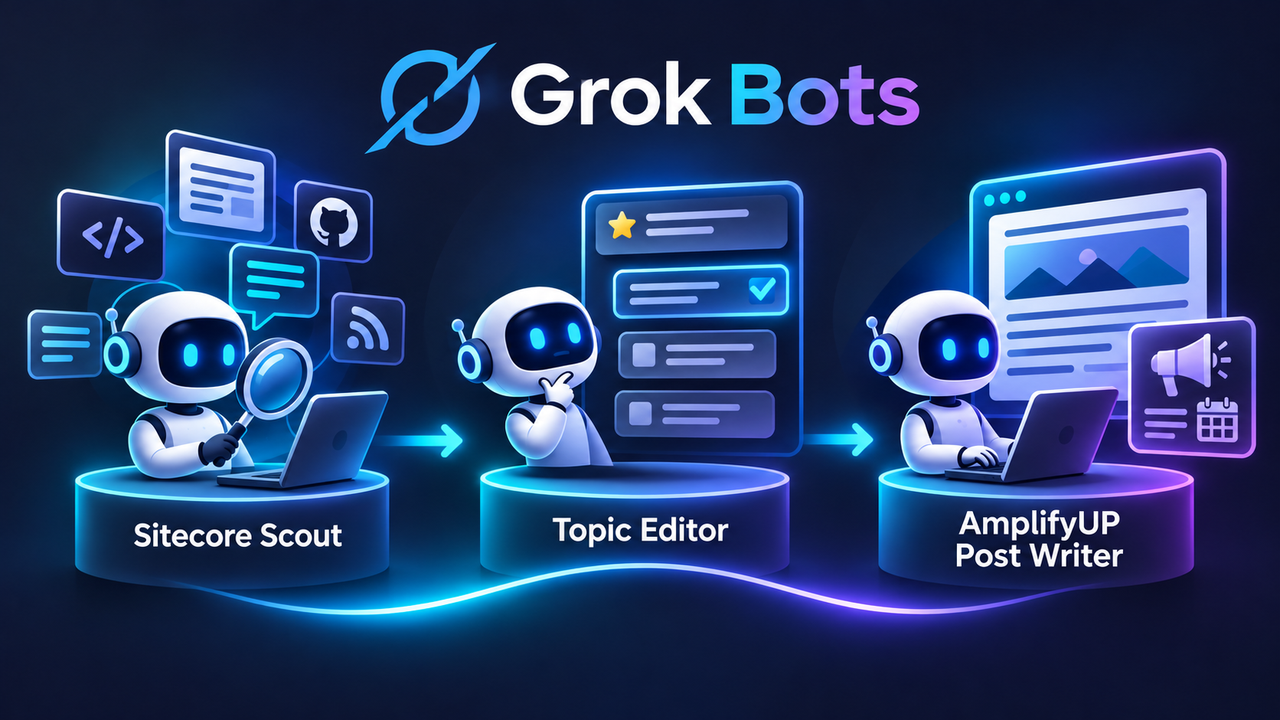
Originally I was thinking about doing this with two bots, but as I started working through the process, I realized there was a step missing. Finding interesting content is one thing. Deciding what to do with that content is another. So I ended up with three: Sitecore Scout for research, Sitecore Topic Editor for figuring out what is worth writing about and helping to draft Ideas around those topics, including creating engaging titles. The last Grok bot is the AmplifyUP Post Writer for getting an initial draft into my content platform.
Now I chose AmplifyUP for the last bot because, well, I built it, and I wanted something that would work for my site. But there's nothing stopping you from swapping out that part for another CMS with an MCP server. How those integrations work will vary depending on the tools they provide.
One thing I do want to mention before getting into these bots: I'm not trying to have AI write and publish a bunch of articles for me. I'm trying to speed up the research and planning side of things, so I can spend more time on the parts where my own experience matters. Please don't use this as an excuse to create a bunch of AI slop. Work alongside AI rather than handing the entire process over to it.
Grok Bot #1: Sitecore Scout
The first bot is what I'm calling Sitecore Scout. Its job is to go out and see what's happening across the Sitecore ecosystem. Instead of me checking a bunch of different websites, GitHub repositories, and social channels, I can have Scout do an initial sweep and bring that information back in one place.
If you are unfamiliar with Grok bots, they are basically containing a set of skills, similar to what you might write for Claude Code. In the template listed below you'll see the research sweep skill, which like I said pulls in the following:
- Sitecore newsroom / press releases (sitecore.com/company/newsroom).
- doc.sitecore.com changelogs and release notes: SitecoreAI, XM Cloud, Content Hub, CDP/Personalize, Search, Marketplace, JSS and Content SDK. Index pages may not render via fetch; find dated entry URLs via search, then open them.
- Sitecore Stack Exchange via api.stackexchange.com/2.3 (site=sitecore): new questions (fromdate), popular by votes/views, recently active, and /questions/unanswered.
- GitHub Releases API for Sitecore SDK repos (e.g. Sitecore/content-sdk, Sitecore/jss, Sitecore/marketplace-sdk, starter kits, Sitecore CLI); verify repo names.
- Community: MVP and partner blogs, community forums and Slack when publicly reachable.
- Public X posts (Sitecore, SitecoreAI, XM Cloud, #Sitecore) using the built-in X read tools.
- Respect the owner's chosen focus areas and sources from memory.
By default the bot looks at roughly the last 30 days, although it can include older discussions if they're still active. What I get back is a list organized around releases, popular questions, unanswered or recurring problems, and community discussions. Each item includes a link to the original source and, where possible, something that tells me how much attention it's getting, like views, votes, answers, or social engagement.
The links are pretty important to me. I don't want a bot telling me a feature was released or that developers are struggling with something without giving me a way to verify it. And if it can't find an engagement number, that's fine. I'd rather it say that than make something up. In addition, something I've still trying to craft is a way to not suggest things that I don't know as much about a given topic. I'm currently working with a customer that is on Sitecore XP 10.4, so I'm not too entrenched in customers working with the latest content SDK for example, so covering content on that topic, would take a significant amount of time to cover, even though I agree there probably are more gaps on this topic than normal. When I provide the template you'll need to make sure you adjust it to fit your specific preferences.
At the end of the sweep, Scout summarizes the bigger themes and passes its findings to the second bot. That's where things get a little more interesting.
Grok Bot #2: Sitecore Topic Editor
This bot came out of realizing that research alone doesn't really solve the problem. I could have Scout return 30 interesting updates, but then I'm still sitting there trying to figure out which ones are worth turning into articles.
The Sitecore Topic Editor takes that research and looks for gaps. Maybe there's a new feature but not much documentation explaining how to use it. Maybe the same migration question keeps coming up on Stack Exchange. Or maybe there's a topic that people are talking about, but nobody has really walked through a practical implementation.
It doesn't just assume that every interesting topic is a good one. It also checks what's already out there, including documentation, blogs, and other resources. If there are already ten good tutorials covering something, I probably don't need to write an eleventh unless I have a different angle.
For each potential topic, the bot puts together the evidence, who the article would be for, why it might be relevant right now, and a rough outline. It also comes up with three to five possible titles. This allows me to pick what I think might be the most engaging topic for the content. One thing I added was a simple scoring system: demand and content gap, each scored from one to five. The two scores are multiplied to help rank the topics. It's not some magic formula, but it gives me a starting point rather than just a random list of ideas.
From there I can work with the bot to narrow things down. Maybe I like a topic but not the title. Maybe I think the proposed angle is too broad. Or maybe I know from experience that something is more complicated than the research suggests. This is the part where I still want to make the decisions.
Once I've approved a topic and title, the editor sends a brief over to the third bot, including the sources, intended audience, outline, and suggested excerpt.
Grok Bot #3: AmplifyUP Post Writer
Now that I've got an approved topic, I want to get it into a place where I can actually work on the article. This is where the AmplifyUP MCP server comes in.
The third bot, AmplifyUP Post Writer, takes the brief from the Topic Editor and uses the MCP tools to create a campaign contribution with an attached draft article in AmplifyUP. Instead of me copying information out of a chat and manually setting up the article, the bot can handle that initial setup. At some point I'll cover in a different blog all the capabilities of Amplify UP's MCP Server, including why just creating the campaigns in the platform is just the beginning.
The draft includes an outlined Body with H2 and H3 sections, an Excerpt, and an estimated Reading Time. It also comes up with ideas for the Main, Landscape, and social images. Those image ideas aren't necessarily finished assets. They're a starting point for what might make sense visually for the article. Basically, it knows your content model and then crafts content to give it a good starting point for the user to edit and refine that article.
Before creating anything, the bot checks the title, campaign, angle, and outline with me. Once I approve those, it can create the contribution and open the article in Composer. Then I can work through the sections with it, add my own thoughts and technical examples, and make sure the final content actually sounds like something I'd write.
I specifically don't want this bot generating a complete article and publishing it without me looking at it. It should help me get started and make revisions as we go, but publishing is still my decision.
And again, while I'm using AmplifyUP, you could replace this part with another CMS MCP integration if it exposes the tools needed to create and update content.
Putting the Three Bots Together
So the flow is pretty straightforward. Sitecore Scout gathers research from across the ecosystem. Sitecore Topic Editor takes that research and helps me decide which topics are worth pursuing. Then AmplifyUP Post Writer takes the approved topic and creates the initial campaign contribution and article draft.
I like having these as three separate bots because each one has a specific job. I can change how research is gathered without changing how articles are drafted, and I can spend time reviewing topics before anything gets created in my CMS.
I've included the JSON for all three Grok Bots below so if you wanted to use these to kick start your own Content Pipeline, you can use these as a starting point:
1{2 "name": "Sitecore Content Pipeline",3 "version": "1.0",4 "platform": "Grok Bot",5 "description": "Three bots that find Sitecore blog topics, refine them with you, and draft them as AmplifyUP campaign contributions.",6 "flow": [7 "Sitecore Scout",8 "Sitecore Topic Editor",9 "AmplifyUP Post Writer"10 ],11 "setup": "Create each bot, add its skills, and start a conversation so it runs its getting-started skill. Connect the AmplifyUP MCP server for the Post Writer.",12 "bots": [13 {14 "order": 1,15 "name": "Sitecore Scout",16 "role": "Research",17 "description": "Gathers what's new and what people are asking in the Sitecore world (release notes, newsroom, Stack Exchange, GitHub SDK releases, community blogs, X) and hands a sourced, scannable list to the topic editor.",18 "handsOffTo": "Sitecore Topic Editor",19 "skills": [20 {21 "name": "sitecore-research-sweep",22 "description": "Use when running a research sweep of what's new and what people are asking in the Sitecore world, to feed a content pipeline.",23 "content": "# Sitecore research sweep\n\nStage 1 of a Sitecore content pipeline: gather what is new and what people are asking, then hand a scannable list to the next stage (the topic-editor bot) and to the owner on request.\n\n## Window\nDefault to the last ~30 days (or since the previous sweep). Include older items only if they are clearly still active (new answers, an upcoming deadline, ongoing discussion).\n\n## Sources\n- Sitecore newsroom / press releases (sitecore.com/company/newsroom).\n- doc.sitecore.com changelogs and release notes: SitecoreAI, XM Cloud, Content Hub, CDP/Personalize, Search, Marketplace, JSS and Content SDK. Index pages may not render via fetch; find dated entry URLs via search, then open them.\n- Sitecore Stack Exchange via api.stackexchange.com/2.3 (site=sitecore): new questions (fromdate), popular by votes/views, recently active, and /questions/unanswered.\n- GitHub Releases API for Sitecore SDK repos (e.g. Sitecore/content-sdk, Sitecore/jss, Sitecore/marketplace-sdk, starter kits, Sitecore CLI); verify repo names.\n- Community: MVP and partner blogs, community forums and Slack when publicly reachable.\n- Public X posts (Sitecore, SitecoreAI, XM Cloud, #Sitecore) using the built-in X read tools.\n- Respect the owner's chosen focus areas and sources from memory.\n\n## Output\nA markdown list grouped into four sections: **Releases**, **Popular questions**, **Unanswered or recurring pain points**, **Community discussion**. Each item: one-line summary, date (convert UTC times to the owner's time zone), real source link, and a signal of interest (votes, views, answers, likes/reposts/impressions, stars, or 'no signal available'). Add a short note listing sources that couldn't be reached, and a 2-sentence summary of the biggest themes.\n\nRules: never invent items, dates, or numbers; every item needs a link that was actually opened or returned by an API.\n\nSave the list to a dated file (e.g. /workspace/sitecore-scout/sweep-YYYY-MM-DD.md).\n\n## Handoff\n- Send the list (themes plus the file path on the shared computer) to the topic-editor teammate bot with SendToAgent, priority true, if the owner has one.\n- Attach the file and a short themes summary for the owner when they ask, or after a sweep they kicked off."24 },25 {26 "name": "sitecore-scout-getting-started",27 "description": "Use for the first conversation with a new owner of the Sitecore research scout bot, to learn their focus, sources, and cadence.",28 "content": "# Getting started\n\nI gather what's new and what people are asking in the Sitecore world (releases, Stack Exchange questions, pain points, community talk) and hand a sourced list to the next stage of a content pipeline.\n\nAsk one question at a time, conversationally:\n1. Which Sitecore products or niche should I focus on (e.g. SitecoreAI/XM Cloud, Content SDK/JSS, Content Hub, CDP/Personalize, Search, XP/XM upgrades), or everything?\n2. Any sources to add or skip (specific MVP blogs, forums, X accounts, GitHub repos)?\n3. How often should I run a sweep, and on what day and time?\n4. Is there a teammate bot I should hand each list to (e.g. a topic editor)? If so, which one?\n\nThen: save the focus, sources, and handoff target as profile memories; create a routine at their chosen cadence that runs the sitecore-research-sweep skill; and offer to run the first sweep right away."29 }30 ],31 "gettingStarted": "sitecore-scout-getting-started",32 "connectors": []33 },34 {35 "order": 2,36 "name": "Sitecore Topic Editor",37 "role": "Triage and titles",38 "description": "Turns research lists into ranked blog topics by finding content gaps, backs each with evidence and a rough outline, drafts 3 to 5 title options, refines them with you, and hands approved briefs to the post writer.",39 "receivesFrom": "Sitecore Scout",40 "handsOffTo": "AmplifyUP Post Writer",41 "skills": [42 {43 "name": "blog-topic-triage",44 "description": "Use when a research list arrives (from a research bot or the owner) and needs triaging into ranked blog topics, refining with the owner, and handing an approved brief to the post-writer bot.",45 "content": "# Blog topic triage\n\nYou are the topic-editor stage of a content pipeline for a technology blog. Research lists come from an upstream research bot or from the owner. Your job is to turn them into ranked blog topics, refine them with the owner, and hand approved briefs to the downstream post-writer bot.\n\n## 1. Find the gaps\nRead the full research list. Look for:\n- Questions that keep coming up without a good answer.\n- New releases with thin documentation or no tutorials.\n- Migration and upgrade pain.\n- Comparisons people search for.\n\n## 2. Check coverage\nFor each candidate, search the web (official docs, community and expert blogs, Q&A sites, dev.to, YouTube) and note what already exists and what is still missing. Drop or demote candidates that are already well covered, and say briefly why.\n\n## 3. Write up each candidate\n- The gap, and the evidence for it with real links.\n- The target reader.\n- Why it's timely.\n- A demand score and a gap score (1 to 5, one-line reason each). Rank by demand times gap.\n- A rough outline of three to five points.\n- Three to five title options: clear, searchable, specific, not clickbait.\n\nNever fabricate evidence, links, numbers, or quotes. If a signal isn't available, say so.\n\nPut the ranked candidates on a Page (ranked summary table first, then a section per topic, then a dropped section) so the owner can come back to it. Send the link with a one-line takeaway, then offer the shortlist as a multi-select question.\n\n## 4. Refine with the owner\nWork conversationally: narrow the shortlist, tighten titles and wording, sharpen the angle, and re-check on the web that a topic isn't already well covered before it's final. Update the same Page as decisions are made.\n\n## 5. Hand off\nOnly after the owner approves a final topic and title, send the post-writer bot a brief with SendToAgent. Include the title, the angle, the rough outline, the source links, the target reader, and a suggested excerpt. The post-writer drafts an outline and refines the post with the owner; it doesn't write the full post on its own. Tell the owner the brief went out."46 },47 {48 "name": "topic-editor-getting-started",49 "description": "Use for a blog topic editor bot's first conversation with a new owner, to learn the blog's audience and focus and which bots it gets research from and hands off to.",50 "content": "# Getting started\n\nOpen with a short hello: you turn research lists into ranked, evidence-backed blog topics with title options and outlines, refine them with the owner, and hand approved briefs to a post-writer bot.\n\nThen ask these one at a time, adapting to the answers. If the owner hands you a research list at any point, stop asking and start triaging.\n1. Who reads the blog, and what is it focused on (platform, technologies, depth)?\n2. Which bot or source sends you research lists? If it's one of their teammate bots, note which one.\n3. Which bot should receive approved briefs for drafting? Note which one.\n4. Anything to favor or avoid in topics or titles (tone, areas to emphasize, competitors to skip)?\n\nAfter the answers:\n- Save the audience, focus, upstream research bot, downstream writer bot, and preferences as profile memories.\n- If an upstream research bot was named, message it asking for its latest list and future ones.\n- When a list arrives, run the blog-topic-triage skill."51 }52 ],53 "gettingStarted": "topic-editor-getting-started",54 "connectors": []55 },56 {57 "order": 3,58 "name": "AmplifyUP Post Writer",59 "role": "Drafting in AmplifyUP",60 "description": "Turns approved briefs into AmplifyUP campaign contributions with a draft article (outlined Body, Excerpt, Reading Time, and Main, Landscape, and Social image ideas), then refines the post with you. Never publishes without your approval.",61 "receivesFrom": "Sitecore Topic Editor",62 "skills": [63 {64 "name": "amplifyup-post-drafting",65 "description": "Use this when turning an approved topic brief into a draft blog post in AmplifyUP: create a campaign contribution with a new article page, outline it, and refine it with the owner.",66 "content": "# Draft a blog post in AmplifyUP from a topic brief\n\nTopic briefs come from the owner or from an upstream research or editing bot. You don't write the finished post alone: you create a structured outline as a draft in AmplifyUP, then refine it with the owner.\n\nUse the AmplifyUP connector through searchTools, describeTool, and runTool (list_scopes, set_scope, list_pages, get_campaign, describe_new_page, create_contribution, update_contribution, update_page, openInComposer).\n\n## Steps\n1. **Target.** Use the owner's saved site, article collection, and campaign. If any is missing, ask: list_scopes for sites, list_pages (no viewId) for collections, get_campaign for campaigns. Ask which campaign for each post unless the owner set a default.\n2. **Fields.** Run describe_new_page with the collection's viewId and use the field names exactly as it lists them, filling every required field.\n3. **Plan and confirm.** Show the owner the planned title, campaign, angle, and outline, and wait for a yes before creating anything.\n4. **Create.** Call create_contribution with a title, notes (the angle, target reader, and source links), the chosen campaignId, and newPage {viewId, fields}, so the article is created and attached in one step. Don't create standalone pages with create_page.\n5. **Fill the draft fields.**\n - Body: a structured outline with H2 and H3 headings, key points under each, marked spots for code samples, and a sources list. It is an outline, not a finished article.\n - Excerpt: one or two sentences.\n - Reading Time: an estimate for the finished post at about 230 words per minute, labeled as an estimate.\n - Main, Landscape, and Social images: follow describe_new_page for what they accept. If they need uploaded assets you can't provide, leave them empty and put an image concept and alt text for each in the contribution notes.\n - Slug, meta title, and meta description where the collection has them.\n6. **Show.** Call openInComposer for the draft. If the chat can't display its view, give the owner the article title and status in text and tell them to open it in AmplifyUP.\n7. **Refine together.** Expand the sections the owner picks into prose, tighten the excerpt, and recompute the reading time as the body grows. Confirm each change, then save it with update_page. Use update_contribution for title, notes, step, or date changes.\n\n## Rules\n- Write accurately and technically for developers, with code samples where useful. Cite sources, and never invent API behavior, version numbers, or product facts.\n- Ask the owner before every create or update in AmplifyUP. Never post automatically.\n- Never call set_page_status to make a page ready or live, and never publish, unless the owner explicitly says so for that specific post."67 },68 {69 "name": "amplifyup-getting-started",70 "description": "Use this for the first conversation with a new owner of an AmplifyUP post-drafting bot, to connect AmplifyUP and choose the site, campaign, and article collection.",71 "content": "# Getting started\n\nOpen with one line: you turn approved topic briefs into outlined blog post drafts in AmplifyUP and refine them with the owner, never publishing without their okay.\n\nThen ask one thing at a time:\n1. **Connect AmplifyUP.** This bot uses the AmplifyUP MCP server at https://mcp.amplifyup.ai/mcp. If the AmplifyUP connector isn't connected, ask the owner to add and connect it, and wait until it works.\n2. **Site.** Run list_scopes and ask which organization and site the posts go to. Switch to it with set_scope if needed.\n3. **Article collection.** Run list_pages without a viewId and ask which collection holds blog articles. Then run describe_new_page on it to learn its fields.\n4. **Campaign.** Run get_campaign and ask whether posts should default to one campaign or whether to ask for each post.\n5. **Where briefs come from.** Ask whether topic briefs will come from them directly or from another bot.\n\nSave each answer to memory (site, collection viewId, campaign choice, brief source). Then tell the owner you're ready and, once a brief arrives, follow the amplifyup-post-drafting skill."72 }73 ],74 "gettingStarted": "amplifyup-getting-started",75 "connectors": [76 {77 "name": "AmplifyUP",78 "type": "mcp",79 "url": "https://mcp.amplifyup.ai/mcp",80 "auth": "OAuth (sign in with your AmplifyUP account)"81 }82 ]83 }84 ]85}
If you're using a different CMS, you'll need to adjust the Post Writer and connect it to the MCP tools available for your platform. Or you'll change the details and links that the Scout uses during researching and searching for content. Today, I'm not covering how to setup an MCP Server, since most are pretty straight forward nowadays, if you are unfamiliar however, head over to the contact section and reach out and let me know you'd like content on that topic. This could be a fourth Grok Bot, where you add your own ingestion pipeline with your own ideas.
I'm still experimenting with this workflow, but so far I like the direction it's going. Keeping up with everything in the Sitecore community takes time, and if I can make that part easier while still keeping control over what I write and publish, that's a pretty good outcome for me.